//
Sep 25, 2026
[
]
Will an AI Receptionist Work With Your Dental Phone System?

If your practice has used the same phone number for years, adding an AI receptionist can sound like a bigger change than you want to make. You may be wondering whether you need new desk phones, a different phone provider, or a new number patients will have to learn.
An AI receptionist may be able to work alongside your existing dental phone system when that system can route the right calls to it and support the required handoffs. Compatibility depends on your provider, account settings, call flow, and the AI service. Confirm the actual setup before changing live patient calls.
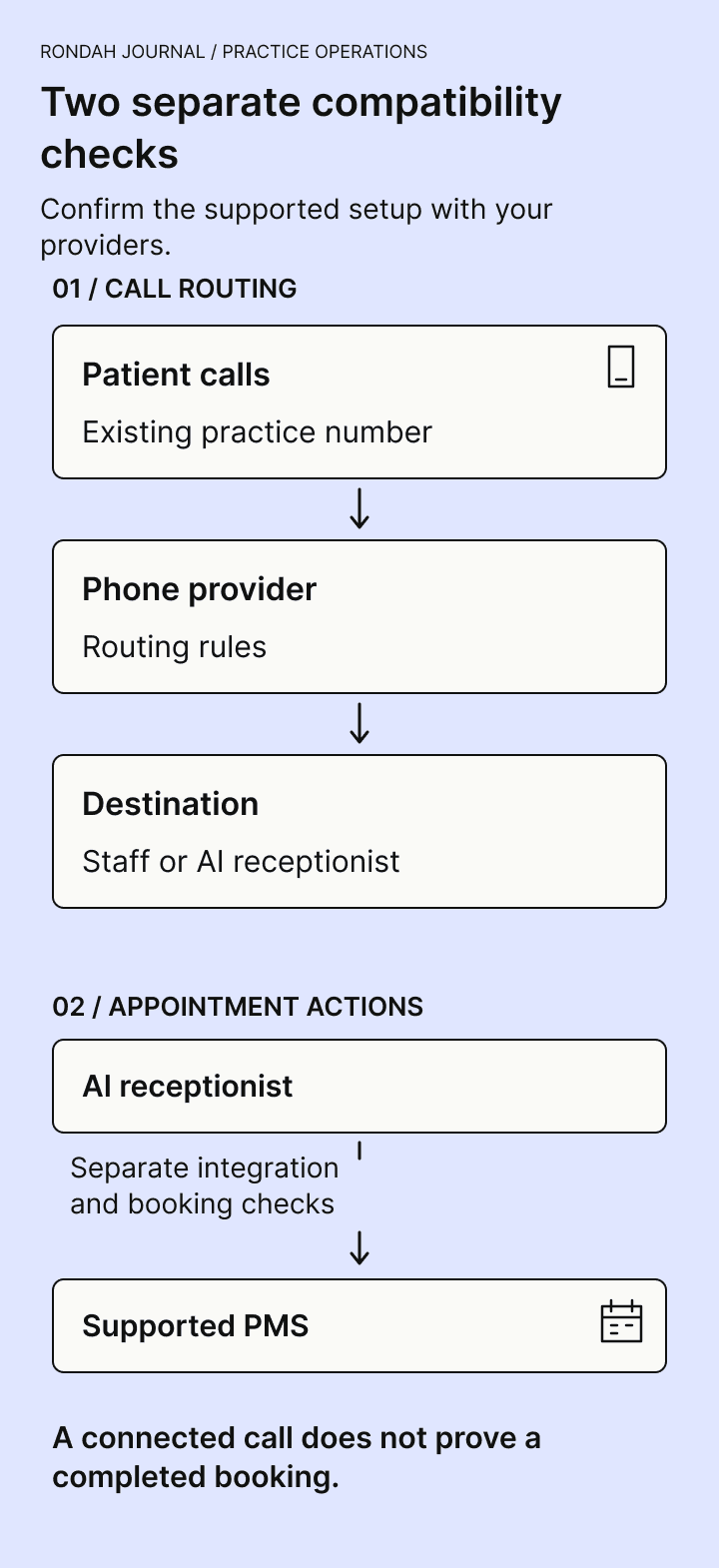
There are two separate checks: whether calls reach the right destination, and whether the receptionist can perform the agreed actions in your practice management system (PMS). A successful phone call does not prove that appointment booking works.
This guide gives your office manager, phone provider, and AI vendor a practical way to check both, starting with the equipment and number you already have.
Start with three questions
Can our current system send only the calls we choose to the AI receptionist?
Can those callers reach the right person or fallback when the AI cannot finish the request?
Can we verify the result and restore the previous routing if something goes wrong?
If a supplier cannot answer one of these, keep it on the setup checklist until there is a clear answer and a successful test. You should not have to infer compatibility from a list of integration logos.
1. Identify the service behind your desk phones
The brand on a handset may be different from the company that provides your phone service or manages call routing. Ask whoever pays the phone bill or administers the system to identify:
Phone service provider and the business account or plan.
System type: hosted internet phone service, an on-site phone system, or another arrangement.
Main public number, other inbound numbers, and any call-tracking numbers used in advertising.
The person or company with permission to change routing.
Existing phone menu, ring groups, call queues, voicemail, and after-hours destinations.
Any shared voice/fax line or other service that could be affected by a change.
A phone system may call an on-site switch a PBX, a group of phones a ring group, or a spoken menu an IVR. Your team does not need to become telecom specialists. The useful result is a simple record of who controls the system and where a call goes today.
Keep account credentials out of email worksheets and public documents. Your providers should arrange any necessary access through an approved process.
2. Choose when the AI should answer
Start with the coverage problem you want to solve. A practice that needs help during lunch has a different call flow from one that wants after-hours coverage.
Overflow or no-answer coverage
The practice's phones ring first. If the team cannot answer within the agreed interval, an eligible call goes to the AI receptionist. Confirm what “no answer” means in your system and how the existing queue or voicemail affects that interval.
Busy-call coverage
Calls go elsewhere when the configured line or queue is busy. A modern phone system may queue a second call instead of reporting a busy condition, so test the actual behaviour your practice uses.
After-hours coverage
Calls follow a separate route when the office is closed. Check the office's time zone, weekends, lunch closures, holidays, and temporary schedule changes. The hours when calls are answered and the hours when patients can be booked should be configured separately where appropriate.
All-call coverage
The AI answers eligible calls first. This places more of the patient's first contact in the new workflow, so your practice needs to test the greeting, routine requests, human access, and fallback carefully.
These are coverage patterns to discuss with your providers. Their availability and configuration vary. For a cautious first rollout, choose a defined coverage window and a clear way to restore the earlier route.
3. Confirm forwarding without assuming you need to move your number
Call forwarding sends an incoming call to another destination. Number porting moves a number between providers. They are different changes. If the agreed design uses forwarding, you may be able to keep your current number with its existing provider; ask for confirmation of your account's requirements and any charges.
Official provider documentation illustrates why the details matter. Weave documents an external forwarding step with a ring duration and a forwarded caller-ID setting. RingCentral documents routing actions and rules for different call-handling conditions. These examples establish that routing controls exist in those products; they do not establish that every account or configuration is compatible with Rondah. Weave forwarding documentation and RingCentral call-handling documentation.
Ask your phone provider and AI vendor to agree on:
Which inbound number and route will change.
Which calls stay with staff, enter a queue, reach the AI, or go to voicemail.
The ring and timeout settings at each step.
Any external-forwarding restrictions, usage charges, or concurrency limits.
How the existing menu, call recording, texting, and reporting are affected.
Whether changes are made by your team, the provider, or the AI vendor.
Do not copy a generic forwarding code from another provider's instructions. Have the person responsible for your system confirm the supported configuration.
4. Test the caller's route back to a person
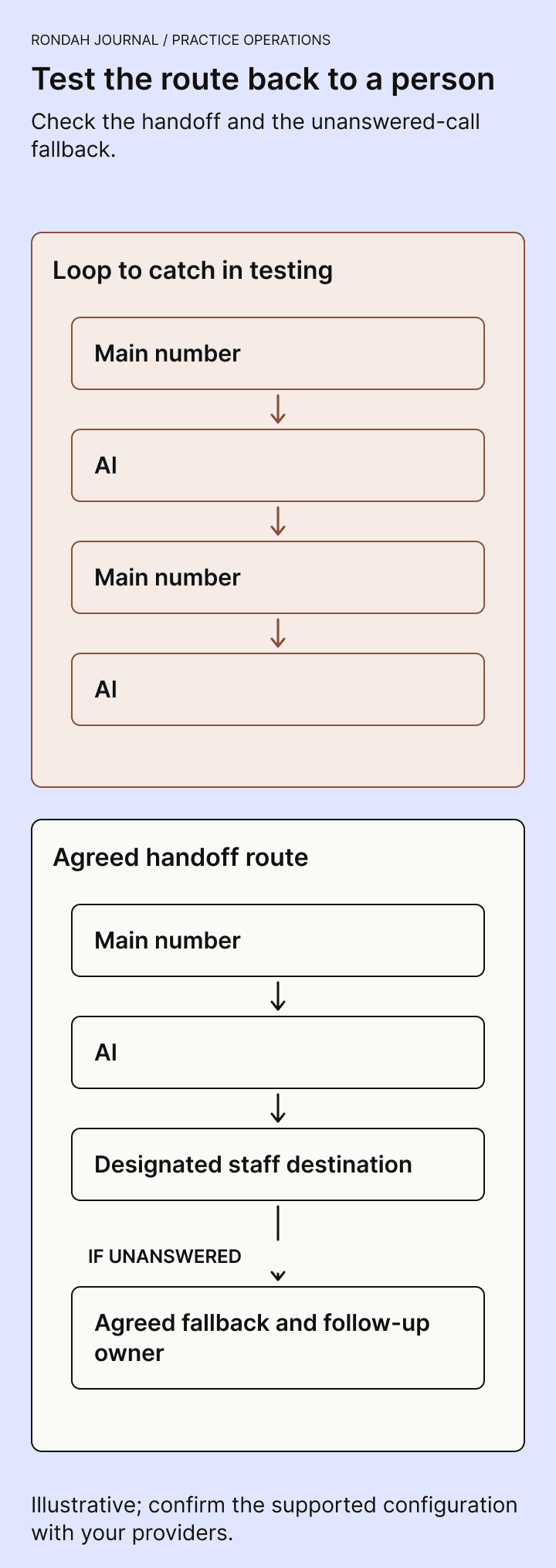
A receptionist can answer a call successfully and still have a problem transferring it. Map the complete route, including the destination the AI will use when the caller needs a person.
One failure worth checking is a loop: the AI sends a call back to the practice's main number, and that number immediately forwards it to the AI again. Ask whether the design needs a separate direct number, an extension, or another supported destination that avoids that route.
Also test what happens when the destination is busy, unanswered, or closed. The fallback should be an agreed message or next step, with a clear record for staff. Do not assume that the presence of a transfer option means a person is always available.
Confirm which caller information reaches the receiving team. Forwarding can affect the number displayed, depending on the system and settings. A callback number should be collected or verified through the agreed workflow rather than assumed from the screen.
Your clinical team should define the practice's urgent-call instructions and escalation destinations. The phone test checks whether those instructions reach the intended person or route; it does not validate clinical triage. Rondah's guide to transferring calls covers the related handoff questions.
5. Check PMS compatibility separately
The phone system transports the conversation. Your PMS holds the patient and appointment information. Before expecting direct booking, ask the AI vendor to confirm the exact PMS product, version or deployment where relevant, and the actions supported in that setup.
Be specific. “Integrates with our PMS” could describe different levels of access. Your practice needs to know whether the agreed workflow can check availability, create a patient record, book an appointment, request a change, or complete a cancellation. Ask which actions require staff review and how a failed action becomes visible.
Use a fictional booking to check the outcome in the PMS. Confirm the appointment type, provider, duration, location where applicable, and the rules your practice relies on. Then test a request for a time that should not be available.
Agree how the receptionist responds when the PMS connection is unavailable or an action cannot be confirmed. The caller should receive an accurate explanation of the next step. A booking request that needs staff review should not be described as a confirmed appointment.
A compatibility worksheet to send to your providers
Copy these questions into your normal setup document. Record the answer, the responsible person, and any test still required.
Current setup: Who provides our phone service, who administers it, and what plan or system do we use?
Coverage: Which calls should go to the AI, and which should stay on our existing route?
Number: Can we retain the public number and provider with this design? Is any porting required?
Forwarding: Which rule triggers it, and what happens to queued, busy, unanswered, and after-hours calls?
Human access: What exact destination receives a transfer, and does it avoid forwarding loops?
Unanswered handoff: What does the caller hear, and who receives the follow-up work?
Caller details: Which number appears to the receiving team, and how is the callback number verified?
Existing services: What changes, if any, affect voicemail, SMS, recording, call tracking, fax, or reports?
PMS: Which product and setup are supported, and what actions can the receptionist complete?
Failure and recovery: What happens if the AI destination, local internet, or PMS connection is unavailable?
Responsibility: Who changes settings, who handles an incident, and who can restore the previous route?
Cost: Are there forwarding, usage, number, integration, or support charges beyond the quoted AI service?
Record unresolved answers as unresolved. “Should work” is a reason to test, not a completed compatibility check.
Run these routing tests before enabling patient traffic
Have your providers set up a controlled test using fictional patient information. Call from an external phone through the actual inbound route. A vendor's standalone demo number cannot prove how your practice number, phone menu, and forwarding rules will behave.
For each test, record the expected destination, what the caller heard, what actually happened, any staff notification, and the PMS result if relevant. Fix failures and repeat the affected test before expanding coverage.
Staff available: Confirm that the team can answer as intended during normal hours.
No answer: Let the agreed interval expire and check that the call reaches the correct destination before another voicemail system intercepts it.
Busy or simultaneous calls: With your provider's help, test the actual queue and line arrangement.
Office closed: Test the normal closed route and a temporary or holiday closure.
Human requested: Ask to speak with a person and confirm the transfer reaches the intended destination without a loop.
Handoff unanswered: Let that destination go unanswered and check the message, follow-up record, and ownership.
Callback identity: Check what number staff see and whether the saved callback details are correct.
Booking and unavailable time: Verify a supported booking in the PMS, then confirm how an unavailable request is handled.
Service failure: Ask the providers to demonstrate or safely simulate the agreed fallback for each relevant failure. Do not disconnect live systems to improvise an outage test.
Restore the prior route: Have the authorized person demonstrate the documented rollback and confirm the practice can receive calls through it.
Do not assume that cloud forwarding guarantees coverage through every outage. Ask which settings live with the provider, which depend on equipment or connectivity in the practice, and what callers will experience in each case.
Keep the decision small and observable
You can be open to AI and still want evidence before changing a familiar system. Start with a defined problem, confirm the supported setup, and listen to calls through your own route. Give the front desk a clear way to report problems and understand what still needs its attention.
If you are evaluating Rondah, bring your phone provider, PMS name, current call flow, and a few awkward requests your team handles regularly. Ask to see a booking, a human handoff, and a request with no suitable appointment available. Use the worksheet to document what is supported for your office.
Book a Rondah demo to review that workflow with the team. For the wider rollout process, see implementing an AI dental receptionist.
Frequently asked questions
Will we need new desk phones?
Possibly not, if the agreed routing works through your current service. Confirm this with both providers. Handset brand alone is not enough to determine compatibility.
Can we keep our existing number?
That depends on the design and provider requirements. Forwarding may allow the number to remain where it is. Ask whether the proposal involves forwarding, porting, or a new number, and what each changes for the practice.
Can we use an AI receptionist only after hours?
After-hours routing is available in some phone systems, but your providers must confirm the supported configuration. Include holidays, temporary closures, human access, and morning follow-up in the test.
Does phone compatibility mean appointments will book correctly?
No. Call routing and PMS actions require separate checks. Confirm the supported actions and inspect a test result in the PMS before relying on direct booking.






©2026 Sundown Technologies Inc.