//
Sep 25, 2026
[
]
The Morning Callback Checklist for a One-Office Dental Team

The first patient is at the desk, the phone is ringing, and last night's messages still need attention. One caller asked to move an appointment. Another started booking but never chose a time. Someone else called twice and then sent a text.
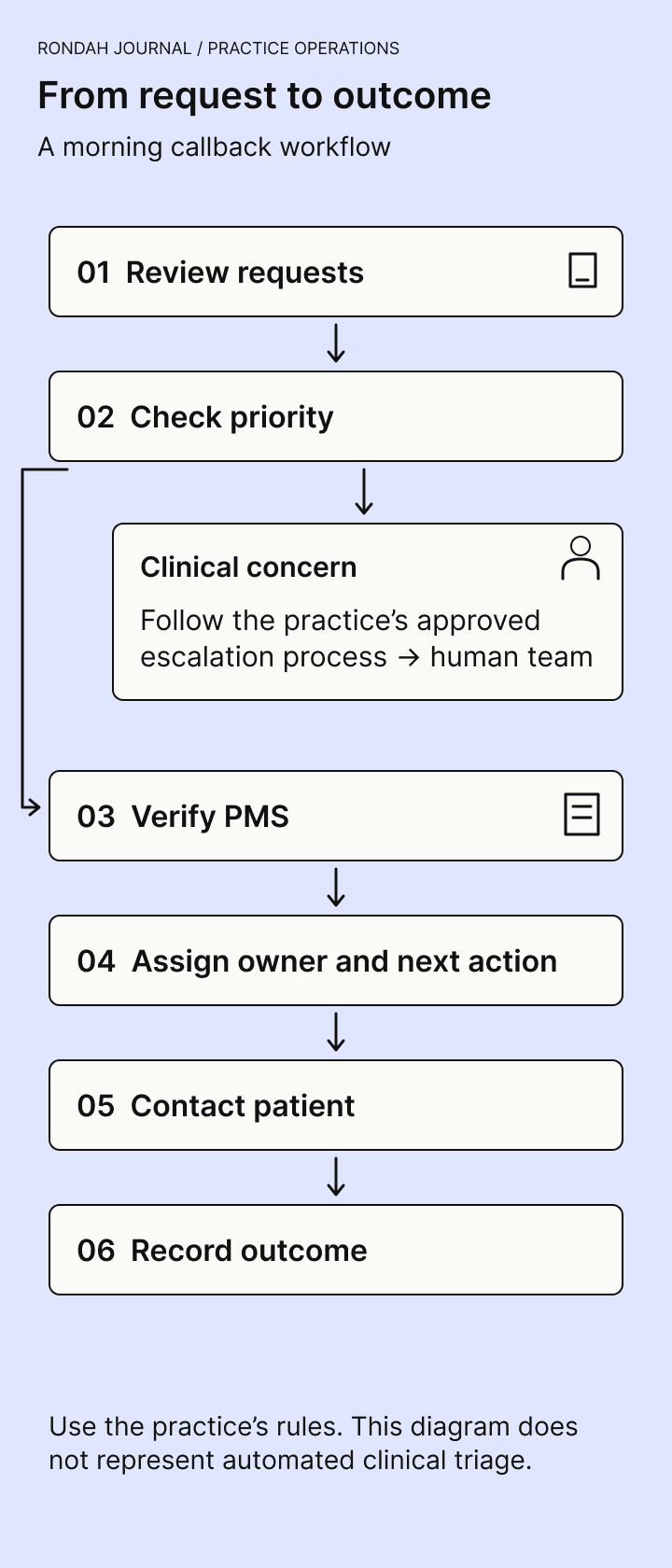
A morning callback checklist gives each unfinished request a clear next step. Start by reviewing all the places requests arrive, separate urgent concerns from routine administration using your practice's approved protocol, check what has already happened in the practice management system, and assign one person to follow through. Close the request when its outcome is documented.
This is a focused dental front desk checklist for returning calls and reviewing overnight requests. You can use it with voicemail, a human answering service, or an AI receptionist. Start with the tools your team already uses.
The morning checklist at a glance
Review messages and unfinished requests received since the last completed review, including older items still open.
Route possible urgent clinical concerns through the practice's approved escalation process as soon as they are identified.
Check today's appointment changes and the current patient record before contacting anyone.
Match repeated calls, texts, and messages to the same request without losing separate questions.
Give every open request one owner, a specific next action, and a due time.
Contact the patient through an appropriate channel and record the result.
Hand over unresolved work and check the queue again at an agreed point in the day.
You do not need to clear every routine request before opening. You do need to know which items cannot wait, who is handling each one, and when the remaining work will be reviewed.
1. Start with unfinished requests across all your channels
Open the sources your practice actually uses: voicemail, the phone system's missed-call list, patient text messages, online appointment requests, answering-service messages, and AI call records where applicable. Include requests carried forward from yesterday.
Choose a clear review window, such as “since the last completed review,” and note when you finished checking each source. That makes a lunchtime handover easier and reduces the chance that a message arriving during the morning review disappears between two people's checks.
A missed call, a message, and an unfinished request are different things. A missed call may be a supplier, a wrong number, or a patient who reached your team later. An answered call may still require action. A new-patient registration may exist even though no appointment was booked.
Review the context before adding work to the queue. If an AI platform shows only the calls it handled, your phone system and other inboxes still matter. Do not assume one screen covers every attempt to reach the practice.
2. Use the practice's escalation rules to set priorities
An overnight message describing a clinical concern needs the practice's approved review and escalation process. Reception staff should pass on the caller's words and relevant context to the designated clinical person. They should not infer a diagnosis or decide that a concern is safe to leave because an automated summary sounds routine.
Agree in advance who receives these concerns, how they acknowledge the handoff, and what happens if that person is unavailable. A notification sent is only one step; someone must accept responsibility for the next action. Urgent concerns should not wait for the next scheduled queue review.
For routine administrative requests, use practical priorities:
Changes affecting today's schedule: a cancellation, an unclear appointment time, or a rescheduling request for a patient expected shortly.
Time-sensitive unfinished bookings: a caller waiting for an answer about an available appointment or a promised callback.
Other open requests: billing questions, non-urgent information requests, and future appointment changes.
Set response times your team can meet, taking account of the request and the expectation already given to the patient. There is no single callback target that fits every practice or every kind of call.
3. Verify the record before making another change
Before calling, check the practice management system (PMS) and recent communications. Confirm whether the appointment already exists, whether another colleague has responded, and whether the patient has sent a newer instruction.
For an appointment-related request, check the patient, appointment type, provider, date, time, duration, and status as relevant. If the caller wanted to reschedule, establish whether the original appointment remains in place. A request to cancel does not by itself prove that the cancellation was completed.
This matters when an answering service or AI receptionist is involved. The conversation record shows what was discussed. The PMS shows the appointment record your team must work from. If they disagree, investigate before reassuring the patient or making a second booking.
For example, Open Dental provides a communications log for patient interactions and an appointment audit trail for reviewing appointment actions. Use the equivalent records available in your system; the exact workflow depends on your software and permissions. Open Dental communications log and appointment documentation.
If you find an error, follow your practice's correction process, record what changed, and give the relevant colleague or supplier enough context to investigate. Avoid quietly correcting the same recurring problem every morning.
4. Give each request one owner and a next action
“Call patient” is often too vague for a colleague to pick up. “Confirm whether the patient still wants the appointment after the cancellation request” is clearer.
Use the practice's approved task system or patient record to capture:
Request identifier and a link or reference to the original message.
Patient or caller details needed for the task, with identity checked through the practice's process.
What the caller needs and what has already happened.
One responsible owner and a backup when that person is unavailable.
Next action and due time.
Current status, last contact attempt, and documented outcome.
Keep patient information in systems approved by your practice. A public checklist is a template for the process, not a place to collect patient details.
Match duplicates carefully. Two calls and a text about the same appointment can share one task. Two different requests from the same household may need separate tasks. A shared phone number is not enough to assume the same person or issue.
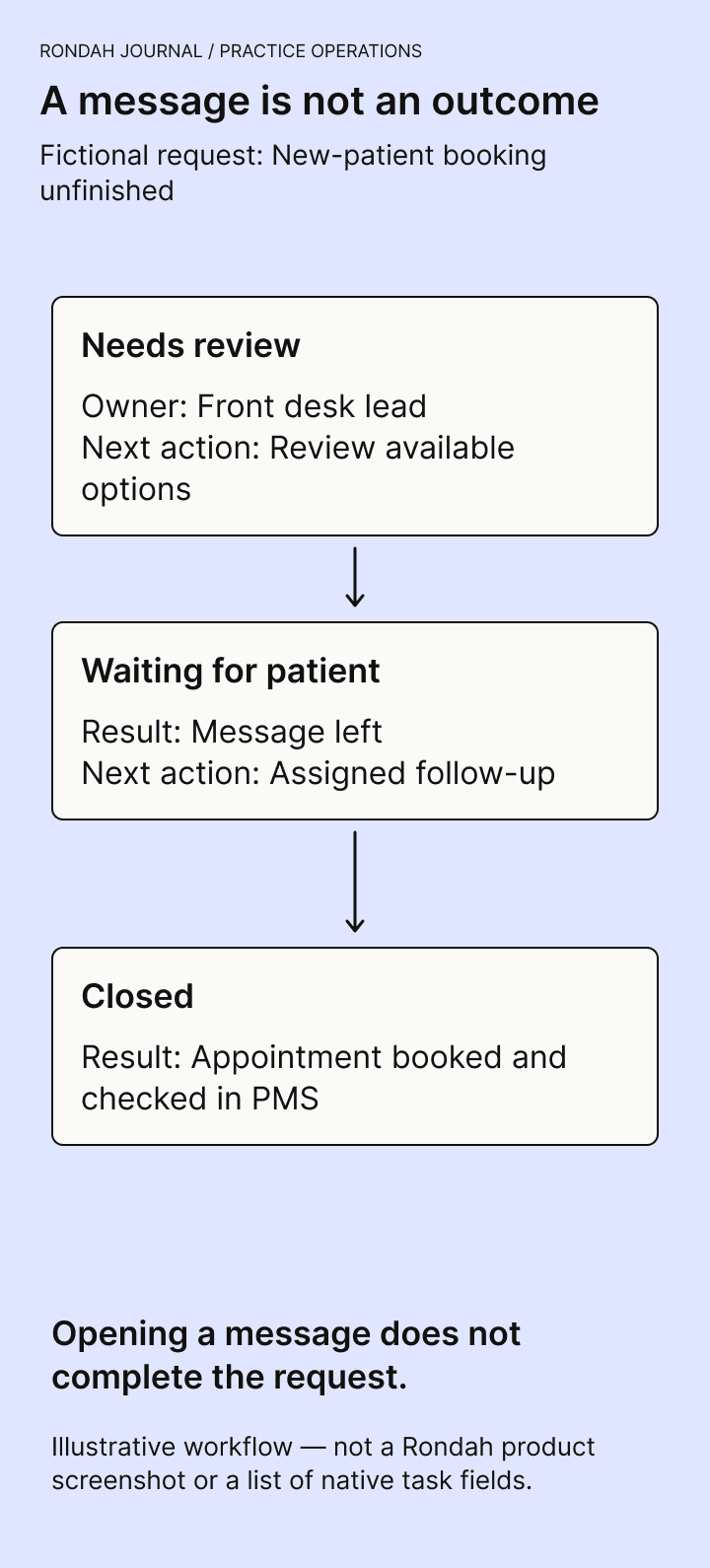
Simple statuses are usually enough: Needs review, Ready to contact, Waiting for patient, Waiting for team, and Closed. The exact labels can match your existing software. Reading a message or leaving a voicemail should not automatically mean the patient's request is finished.
5. Return the call with the context in front of you
Check the latest record again just before contacting the patient, especially if several people are working the queue. Use the recorded contact preference and your practice's identity-verification procedure before discussing appointment or health information.
For a routine conversation, a helpful opening is:
“Hello, this is [name] from [practice]. I'm returning your call. Is now a good time to speak?”
After verification, explain what you can see, confirm what the patient still needs, and agree on the next step. If no suitable appointment is available, explain the options your practice actually offers. Do not promise a specific slot, wait-list outcome, or clinician callback time that has not been agreed.
If the call reaches voicemail, follow the patient's communication preferences and the practice's policy. US HHS guidance permits patient messages but advises limiting the information disclosed and accommodating reasonable confidential-communication requests. A brief request to call the practice can be more appropriate than describing the treatment or the reason for the appointment. HHS guidance on patient messages.
An example to adapt is: “Hello, this is [name] calling from [practice]. Please call us at [number]. Thank you.” Whether even the practice name is appropriate depends on the patient's recorded preferences.
6. Record an outcome that the next person can understand
After each attempt, document what happened and whether another action is needed. Useful outcomes include:
Appointment booked and checked in the PMS.
Requested change completed and communicated to the patient.
Question answered, with no further action needed.
Message left; another attempt is due under the practice's policy.
Waiting for a clinical or administrative decision, with a named owner.
Patient declined or no longer needs the request, with the outcome recorded.
Decide how your practice handles unsuccessful contact attempts, including how many attempts are appropriate, which channels may be used, and when staff review is required. Do not mark an unanswered request as resolved simply to reduce the open count. If your policy allows administrative closure after attempts are exhausted, record that specific outcome.
A worked example: three messages at opening
The following examples are fictional. Times illustrate one team's plan, not a recommended clinical response standard.
Request A: a cancellation for this morning
Before review: A voicemail asks to cancel a morning appointment. The appointment still appears in the PMS.
Next action: The front desk owner checks the request and follows the practice's cancellation process before the scheduled visit. They update the appointment and communicate the outcome as appropriate.
After review: Closed only after the required actions are recorded. Any work to offer the released time to another patient follows the practice's separate scheduling process.
Request B: registration completed, booking unfinished
Before review: An after-hours caller provided registration details but could not find a suitable time. There is no appointment in the PMS.
Next action: One team member reviews available options and returns the call within the expectation given to the patient. They check whether the caller has contacted the practice again first.
After review: Waiting for patient if a message was left, with the next attempt assigned. A registration remains distinct from a booking.
Request C: two calls followed by a text
Before review: Two missed calls and a text ask about the same appointment time. Another colleague has already replied.
Next action: Check that the reply answered the request and that there is no newer question. Link the related messages according to the practice's recordkeeping process.
After review: Closed if the request is complete. No extra callback is needed solely because the missed-call entries remain in the phone log.
Fit the checklist into a small team's day
Assign one person to lead the opening review and name a backup for absences. Reserve a short, realistic review period, then revisit open items at agreed points, such as before lunch and before closing. These routine checks supplement the immediate escalation process for urgent concerns.
At handover, review overdue requests, unanswered promises, and items waiting on someone else. A colleague should be able to continue without replaying every conversation or asking what “done” meant.
If unfinished bookings repeatedly come from a lack of suitable appointments, investigate availability and booking rules. More callbacks cannot create capacity that the schedule does not offer. If most problems are incomplete messages or confusing routing, address the call-handling process instead.
Where AI call review fits
An AI receptionist can change how a request reaches your team. It does not remove the need to review exceptions and decide what to do next. Ask to see a completed booking, an incomplete booking, and a call that required a person. For each one, check what the receptionist said, what happened in the PMS, and what your staff can see afterward.
When evaluating Rondah, bring that same morning-review workflow to a demo. Ask the team to show the call record, follow-up context, and supported actions for your practice. Keep ownership and callback decisions clear within the process your team uses.
Book a Rondah demo with a few typical requests from your front desk. Use fictional patient details to walk through them.
Frequently asked questions
Should we return every missed call?
Review missed calls using a consistent practice policy. Check for a message, a matching request in another channel, or a later conversation before creating a duplicate callback. Caller ID alone does not tell you the purpose or urgency of a call.
Does a message marked “read” mean the request is complete?
No. Read status shows that someone opened the message. Completion needs a documented outcome or a clearly recorded closure reason under the practice's policy.
Do we need a new tool to use this checklist?
You can start in your approved PMS or task system. The essentials are a reliable record, one owner, a next action, a due time, and a clear outcome. Consider additional software when it addresses a specific problem in that process.
What should we review after an AI-booked appointment?
Use your agreed quality-review process to check the booking and any exceptions against the PMS. If the conversation and appointment record differ, investigate the discrepancy. Rondah's guide to AI appointment booking explains the related scheduling questions.
Explore Rondah’s dental call analytics and receptionist console.






©2026 Sundown Technologies Inc.