//
Jul 14, 2026
[
]
Best AI Dental Receptionists: 5 Options for Your Practice

Updated October 7, 2026. Vendor details checked October 7, 2026.
The best AI dental receptionist for your practice should handle the calls you need covered, follow your scheduling rules, and leave your team with a clear outcome. A natural voice matters. So does knowing whether a patient was actually booked, asked to wait for a callback, or transferred to someone who could help.
Rondah, Arini, Weave, Dentina and Adit all offer products worth evaluating. Their packages, phone requirements and supported workflows differ. For a single dental office, start with your busiest uncovered moments: lunch, check-in, staff absences or after closing. Then compare what each system can complete in your specific setup.
This guide is published by Rondah and includes our product. Competitor descriptions draw on the official pages linked below; they are not results from independent hands-on testing. Use the same demo checklist for every vendor, including us.
Choose the coverage you need before choosing a platform
An AI receptionist, a human answering service and voicemail can each serve a useful purpose. The right choice depends on what should happen during the call.
Voicemail captures a message for later. It can suit a practice with low out-of-hours demand and a reliable callback process, but callers still wait for a response.
A human answering service gives callers a person to speak with. Ask whether the service only takes messages or also schedules, which systems its agents can access, and when your own staff must step in.
An AI dental receptionist can handle routine conversations and supported actions according to configured rules. Direct booking, transfers, text follow-up and outbound calls vary by product, plan and integration.
For many small teams, a useful starting point is limited coverage for overflow or after-hours calls. Keep the front desk involved in the situations that need judgment, then expand only after reviewing actual outcomes. Our after-hours dental answering guide explains the coverage choices in more detail.
Five AI dental receptionist options to compare
These are options to shortlist by fit, rather than a scored league table. Confirm the current package and availability of every workflow you intend to use.
Rondah: routine call coverage for independent practices and dental groups
Rondah’s AI dental receptionist for independent practices handles routine patient calls, common questions and supported appointment bookings, with agreed routing or follow-up when a conversation needs a person. The practice offering covers overflow and after-hours use; Rondah also has a separate DSO offering.
Consider Rondah when your goal is to reduce the phone work interrupting your front desk. Bring your PMS, phone provider, appointment types and exceptions to the demo. Confirm the supported setup rather than assuming every integration supports every action.
Pricing: request a practice-specific quote covering the subscription, setup, usage allowances and contract terms.
Ask to see: a new-patient booking in the supported PMS, a request with no suitable availability, and a call that needs your team. Check the record or follow-up left behind after each.
Arini: inbound calls and broader patient-engagement workflows
Arini’s current website describes inbound voice AI, outbound patient reactivation and automated confirmations for single-location practices and groups. It also markets enterprise services and oversight across locations. Its positioning is broader than a small-practice-only receptionist.
Consider Arini if you want to evaluate inbound coverage alongside outbound patient engagement. Request a quote for the specific agents and workflows you need, and ask which are included at launch.
Ask to see: an inbound appointment and an outbound workflow in your PMS, including how existing reminders are coordinated. Keep a basic answering requirement separate from optional broader automation.
Weave: AI reception within a wider communications platform
Weave’s AI offering describes voice and text reception, answers to common questions, staff handoff and appointment booking with qualified PMS integrations. Its TrueLark page also describes missed-call text conversations and online booking.
Consider Weave if you already use its platform or are comparing a broader communications package. Establish exactly which voice, text and booking capabilities your proposed package includes; a missed-call text response and an answered voice call are different experiences.
Ask to see: what a caller hears when staff are busy, whether the appointment is booked directly or submitted for approval, and what your team sees afterward. Request the combined platform and AI price.
Dentina: inbound plans with published starting prices
Dentina’s product and pricing page lists direct PMS booking, with Standard Inbound starting at $299 per month and Premium Inbound at $399 per month, billed annually, per location, for up to three providers. These are advertised starting prices, not a quote for every office.
Its published plan differences matter: Premium includes warm transfer and two-way AI SMS, while its FAQ says Standard takes a detailed message by default. Outbound campaigns have custom pricing.
Consider Dentina if comparing defined inbound packages helps your evaluation. Ask to see the exact booking and transfer workflow available on your proposed tier. Confirm billing terms, additional-provider costs and which outbound functions are currently available.
Adit: AI Front Desk for practices considering its phone platform
Adit’s AI Front Desk page describes call answering, scheduling, rescheduling, voice/text/chat and transfers with a conversation summary. Its FAQ says Front Desk runs on Adit Voice, its VoIP phone system.
Consider Adit if you already use Adit Voice or are willing to evaluate a phone-platform change. Include number transfer, staff training, existing contracts and the complete package price in that decision.
Ask to see: your current call-routing arrangement reproduced on the proposed system, a supported appointment written to the PMS, and the fallback when staff cannot answer a transfer. Obtain current commercial terms instead of relying on a promotional headline.
What to check beyond the feature list
1. What does “PMS integration” actually allow?
A vendor can recognize patient information without being able to complete every scheduling action. Ask separately about reading availability, creating appointments, rescheduling, cancellations and recording follow-up. Confirm your exact PMS product and version.
Then test your rules: appointment length, provider, operatory, new versus existing patients, and blocked times. If the only available slot is unsuitable, a good outcome may be a clear handoff or callback request. The system should not promise an appointment it cannot confirm.
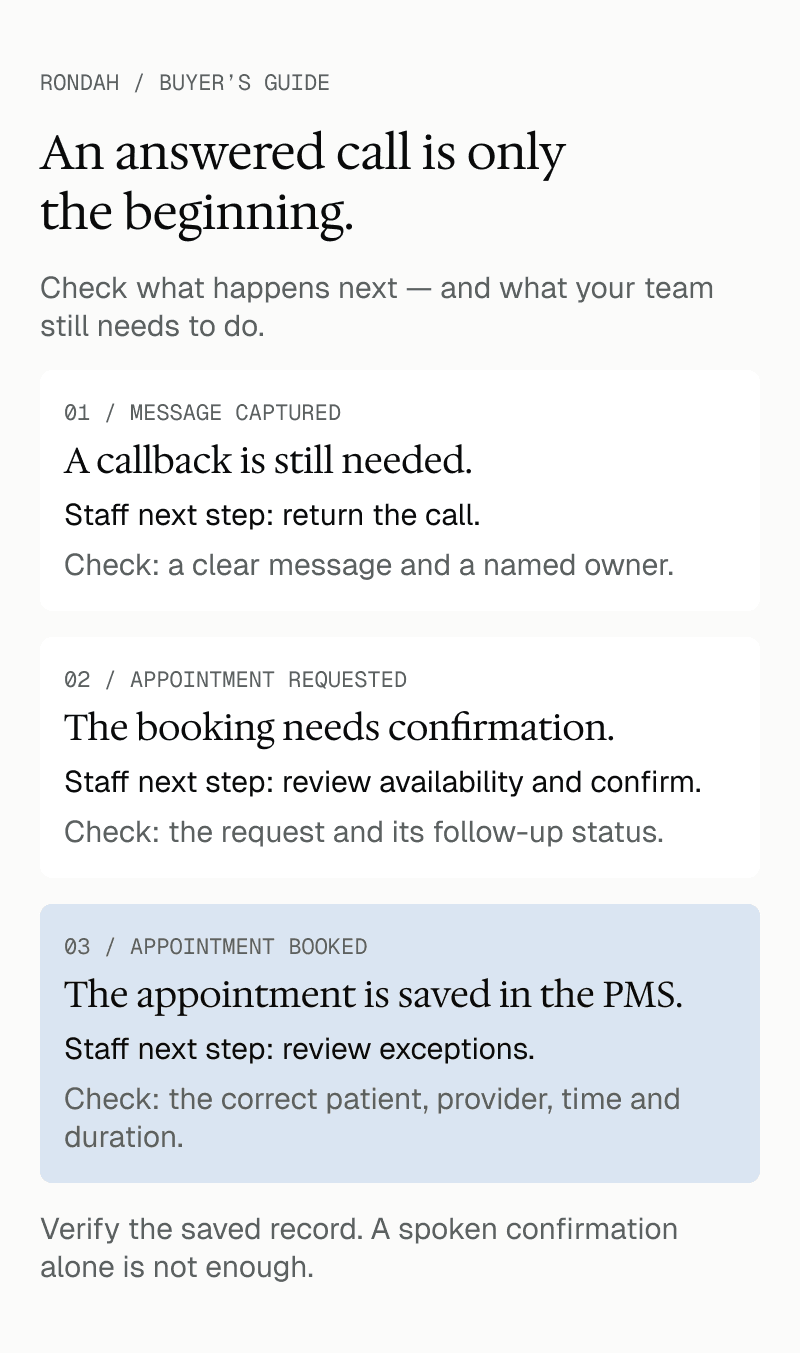
Watch the resulting PMS record during the demo. A spoken confirmation alone does not show that the correct appointment was saved.
2. How will it work with your phone system?
Ask whether the setup uses call forwarding, requires a different phone platform, or depends on another connection. Establish when AI answers, how long staff phones ring first, what happens outside office hours, and how to restore your previous routing.
Test a transfer while the receiving line is busy. Make sure the patient does not end up in a loop. Use our dental phone-system compatibility checklist to prepare the information your vendor needs.
3. When does your team take over?
Set clear boundaries for requests outside approved workflows, upset callers, unclear patient matches and callers who ask for a person. For urgent concerns, use a practice-approved escalation process and wording; the receptionist should not invent clinical advice.
A transfer needs a fallback when nobody answers. Agree where the message goes, what the caller is told, and who checks it. Ask to see how your team identifies unresolved calls each morning.
4. What can you review and control?
Ask which call outcomes, summaries, transcripts or recordings are available in your plan, who can access them, and how retention and deletion work. Have the person responsible for privacy review the proposed data handling and relevant agreements.
Operationally, you need to distinguish a completed booking from a booking request, a successful transfer from an attempted one, and a resolved question from a callback still waiting for staff. A count of answered calls cannot show all of that.
Compare the total cost of the work being covered
Put each quote against the same requirements: locations, providers, call volume, coverage hours, languages, booking actions and transfer needs. Check the base fee, setup, included usage, overages, phone service, integrations, optional channels, support and cancellation terms.
A lower subscription can still leave more work for your team. Equally, a larger package may include features your office will not use. Our AI dental receptionist cost guide helps frame the budget discussion.
Before a pilot, record missed calls and the time staff spend returning them. During the pilot, track correct bookings, completed visits from those bookings, unresolved calls, staff corrections and the actual bill. Keep booked appointment value separate from collected revenue, and do not count every AI booking as a patient you would otherwise have lost.
Run the same five test calls with every vendor
Use fictional patient details and an agreed test environment. Ask your office manager or receptionist to bring the awkward requests they handle regularly.
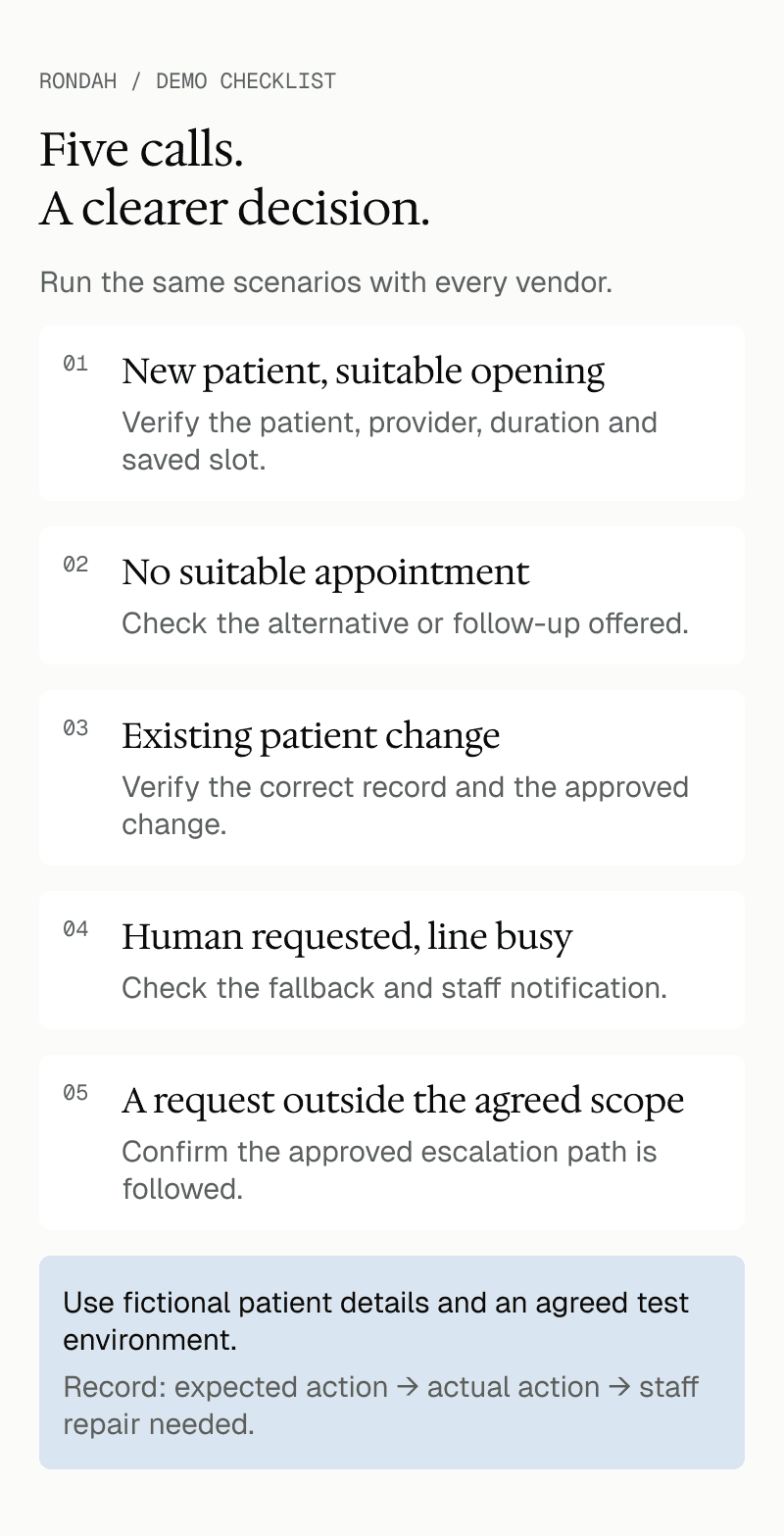
New patient, suitable opening: request an appointment, then verify the patient details, provider, duration and saved slot.
No suitable appointment: request a time that conflicts with your rules. Check the alternative or follow-up offered.
Existing patient change: ask to reschedule or cancel. Confirm the system identifies the correct record and makes only the approved change, or hands it off clearly.
Human requested, line busy: ask for a person and make the receiving line unavailable. Check both the caller experience and the staff notification.
Outside the agreed scope: ask something the receptionist is not authorized to answer. Confirm it follows the approved escalation path.
For each scenario, write down the expected action, the action taken and anything staff must repair. Repeat a failed scenario after configuration changes. Our guide to testing a dental AI receptionist includes a fuller pre-launch process.
Frequently asked questions
Which AI dental receptionist is best for a small practice?
Choose the one that demonstrates your essential workflows with the least avoidable work left for staff. For one office, supported booking, dependable call routing, clear follow-up and a suitable total price often matter more than a long feature list. Rondah’s independent-practice offering is one option to include in that evaluation.
Can an AI receptionist book directly into dental software?
Some products advertise direct booking, but support depends on the PMS, version, plan and action. Ask the vendor to demonstrate your appointment types in the supported setup and show the saved record. Booking, rescheduling and cancellation should each be checked separately.
Can we use AI only after hours or when our team is busy?
This is an available use case with several providers, including Rondah. Agree the coverage schedule and call-routing rules during setup, then test daytime overflow, evenings and the return to normal office coverage.
Does an AI receptionist replace our front-desk team?
It can take on agreed phone tasks. Your team still handles in-person patients, exceptions, clinical coordination and the decisions outside those workflows. Judge the system by the work it completes correctly and the time it gives back to your team.
See how Rondah would handle your practice’s calls
Bring your PMS name, phone provider and three real scheduling challenges to a Rondah demo. We will review the supported setup and walk through routine booking, a request with no suitable availability, and a call that needs a person.
Explore Rondah for independent practices or book a demo to discuss the call coverage your team needs.






©2026 Sundown Technologies Inc.