//
Dec 2, 2025
[
]
How DSOs Use AI to Reduce Missed Calls and Capture Patient Requests

Updated October 23, 2026
DSOs use AI receptionists to cover calls when local teams are busy or offices are closed, answer approved practice questions, and complete supported scheduling tasks. The operational goal is to give each patient request a clear outcome: an answer, a verified appointment action, a transfer, or an assigned follow-up.
AI cannot guarantee that every call becomes a booking or that every request is resolved without staff. A successful rollout connects call coverage to each location’s rules, practice management system, and accountable team. This guide explains how to build and measure that workflow across a dental group.
Find where calls are being lost
Begin with a baseline by location, day, and time window. Review calls that go unanswered, reach voicemail, are abandoned, or lead to a message that nobody follows up. Keep after-hours demand separate from calls during staffed hours; the causes and remedies may differ.
Coverage gaps: lunchtime, opening and closing periods, evenings, weekends, and unexpected staff absences.
Scheduling friction: appointment types, providers, or locations the caller cannot book through the current process.
Follow-up gaps: messages with no owner, incomplete contact details, or no record of the next action.
Routing problems: callers reaching the wrong office or a transfer destination that is unavailable.
Use the same definitions throughout the pilot. For example, agree whether a short abandoned call counts as missed and whether repeat attempts count as separate calls or one patient request. Without consistent definitions, a change in the report can look like a change in performance.
Design four clear call outcomes
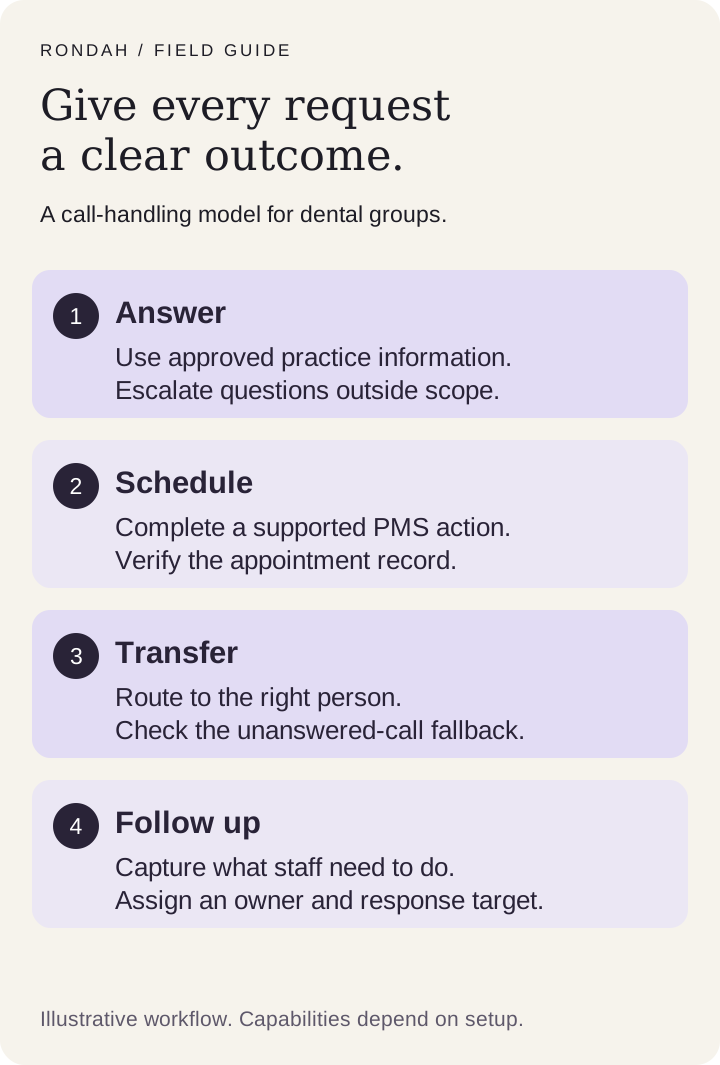
The diagram is an operating model, not a promise that every deployment supports every action. Confirm the outcomes your system can deliver and assign a fallback for each one.
1. Answer the practice question
Give the assistant approved information about office hours, location, services, and practice policies. Identify the owner who updates that information when an office changes its schedule or services. Questions outside the approved scope should go to staff; the assistant should not invent an answer.
2. Complete a supported scheduling action
Confirm the correct office, patient, appointment type, provider rules, and availability before an appointment action is completed. Verify the result in the PMS. Capturing an appointment preference is useful, but it is different from creating or changing an appointment in the schedule.
3. Route to an available person
Define which requests should reach the front desk, a central team, or another configured destination. Test the transfer during business hours and outside them. A call that was transferred but never answered still needs a known outcome.
4. Capture a follow-up that staff can act on
When there is no suitable slot, scheduling is disabled, or the request needs staff judgment, capture the reason for the call and the necessary follow-up details. Assign an owner and a response target. The team should be able to see what remains unresolved without replaying every call.
Standardize the process while preserving local rules
A group-wide script is only part of the setup. Two offices can share a brand and still have different providers, accepted appointment types, opening hours, and scheduling policies. Keep the group’s standards consistent while documenting the local differences.
Group standards: approved language, escalation categories, reporting definitions, and expectations for follow-up.
Location settings: hours, contact details, providers, appointment types, scheduling restrictions, and transfer destinations.
Operational ownership: a local reviewer for office details and a central owner for rollout decisions and recurring issues.
Change process: a named person who approves and tests updates before they affect patient calls.
Use a shared location checklist during onboarding. Mark a location ready only when its rules and fallback behavior have been tested. A PMS logo on a vendor page does not establish that every action is enabled for every office.
Run a pilot before expanding coverage
Establish the baseline
Choose representative locations and a comparison period with similar days and operating hours. Capture call volume, missed or abandoned calls, scheduling requests, completed bookings, and unresolved follow-ups. Note changes in staffing, marketing, holidays, or office capacity that could affect results.
Test with realistic scenarios
Before routing patient calls, run fictional test cases for a new patient, an existing patient, an appointment change, no availability, a closed office, and a request that needs a person. Inspect both the conversation and the resulting PMS record or message.
Start with a defined coverage window
After-hours or overflow coverage can make the initial scope easier to observe. Specify exactly when calls route to AI, when people take over, and how to restore the previous routing if a serious issue appears. The right starting point depends on the group’s call patterns and operational capacity.
Review exceptions and expand deliberately
Have staff review unresolved requests and scheduling corrections regularly during the pilot. Fix recurring causes before adding locations or call types. Expand when the workflow meets the criteria you set, rather than because the assistant has answered a large number of calls.
Measure outcomes beyond the answer rate
Answer rate: answered calls divided by calls offered to the measured service. Keep the same inclusion rules across periods.
Booking completion: verified new bookings divided by eligible booking requests. Report reschedules and cancellations separately.
Unresolved follow-ups: requests still needing staff action at the review cutoff, including their age and owner.
Scheduling quality: incorrect appointments or records that require correction, with the reason documented.
Staff effort: time spent reviewing, correcting, and completing follow-ups. Label modeled time savings as estimates.
A useful dashboard lets you move from the group total to a location and then to the underlying call outcome. Our dental call analytics overview explains the reporting context for Rondah.
A hypothetical example: why answered calls are not bookings
Suppose a pilot receives 100 after-hours calls. Of those, 40 contain eligible new-booking requests and 25 result in verified new appointments. The booking-completion rate for those requests is 25 divided by 40, or 62.5%. It is not 100 bookings, and it is not proof of 25 appointments that would otherwise have been lost.
These numbers are illustrative, not Rondah customer results. To estimate incremental impact, compare against a suitable baseline and account for repeat callers, later staff bookings, cancellations, and attendance. Collected revenue requires its own reconciliation; multiplying answered calls by an average patient value is not measured revenue.
Where Rondah fits in a DSO workflow
Rondah supports inbound dental call handling, approved practice questions, and scheduling actions in supported configurations. Depending on setup, requests can be transferred, captured as a message, or recorded for scheduling follow-up. When a suitable appointment cannot be booked, the next step should remain clear to the team.
Confirm the exact PMS connector, enabled actions, and fallback behavior for each office. Do not assume warm transfers or outbound reminder and recall campaigns are part of the current deployment. Review the Rondah AI receptionist for DSOs to discuss the group’s requirements.
Frequently asked questions
Can AI eliminate every missed call across a DSO?
AI can extend coverage and handle supported requests, but complete elimination is not a reliable promise. Phone routing, outages, caller behavior, and requests requiring staff can still create gaps. Measure both coverage and unresolved demand.
Can one assistant support different rules at each location?
That is a requirement to demonstrate during evaluation. Test office identification, local hours, provider restrictions, available appointment types, and the right transfer destination for each pilot location.
What happens when an appointment cannot be booked?
The workflow should explain the limitation without inventing availability and capture a clear follow-up for staff. Agree on ownership and a response target before launch, then monitor whether those requests are completed.
Does AI replace the group’s front-desk team?
It can cover routine and after-hours work while staff handle exceptions, sensitive conversations, and in-office needs. Include the people who will review calls and complete follow-ups in the pilot design.
Build the pilot around your locations
Prepare a list of pilot offices, PMS versions, coverage gaps, scheduling rules, and escalation contacts. Book a Rondah walkthrough to review a workable call-handling scope. For the evaluation questions to bring, use our automated front-desk checklist.






©2026 Sundown Technologies Inc.